Updated November 2026 · Prices in USD
Bitwarden and 1Password are two of the most popular password managers in the world. Both encrypt your logins, sync them across devices, fill in passwords for you and store 2FA codes and passkeys.
So which one should you pick? This guide compares them on security, features, everyday experience, compatibility and price, and ends with a clear recommendation for each type of user.
1. Bitwarden vs 1Password: quick comparison
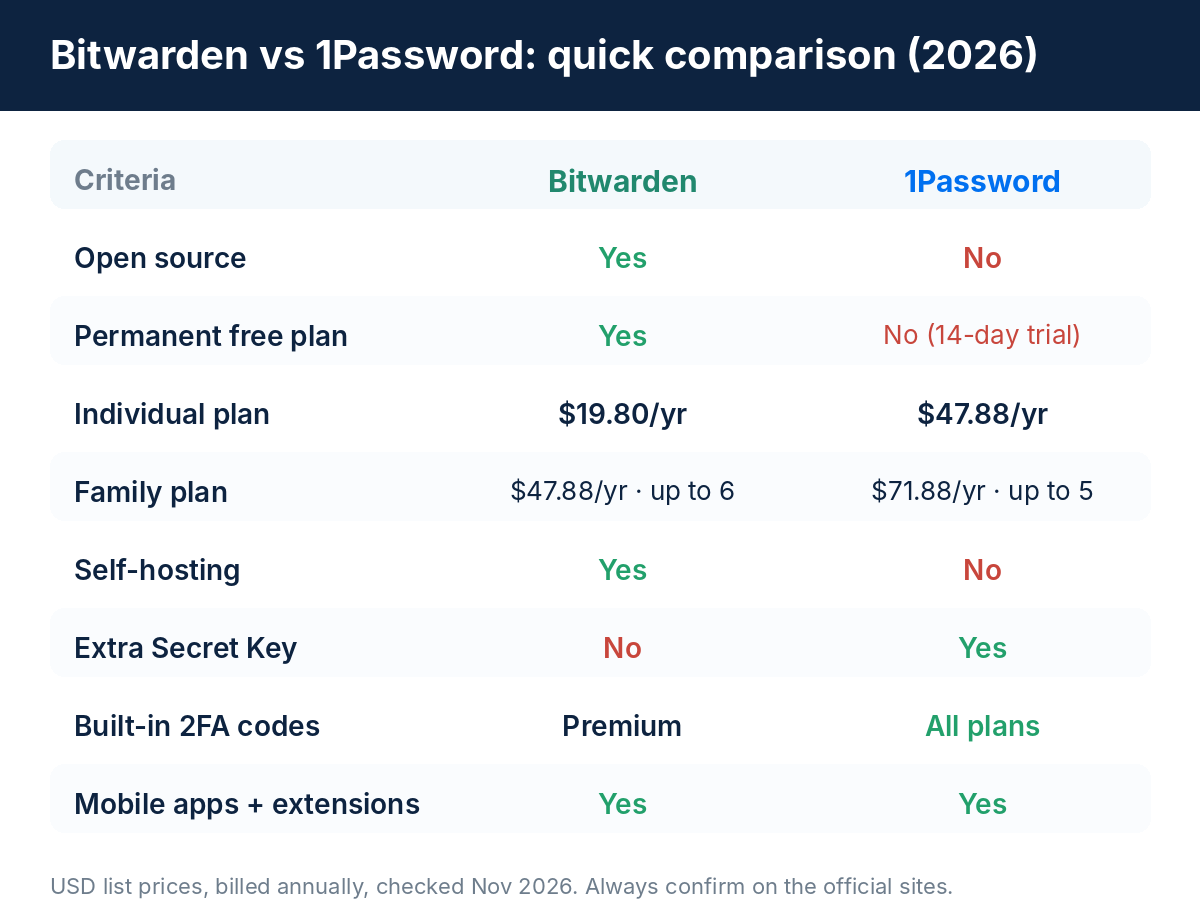
| Criteria | Bitwarden | 1Password |
|---|---|---|
| Open source | Yes | No |
| Permanent free plan | Yes | No (14-day free trial) |
| Individual plan | $19.80/year | $47.88/year |
| Family plan | $47.88/year, up to 6 people | $71.88/year, up to 5 people |
| Mobile apps | Yes | Yes |
| Browser extensions | Yes | Yes |
| Family sharing | Yes | Yes |
| Self-hosting | Yes | No |
| Extra Secret Key | No | Yes |
| Built-in 2FA codes | Premium plan | All plans |
List prices billed annually, checked in November 2026. Plans, promotions and local taxes change, so confirm on the official pricing pages (Bitwarden and 1Password) before you subscribe.
2. Security and encryption
On security, this is not a case of one strong and one weak option. Both are well-regarded, and both are built so the company cannot read your vault.
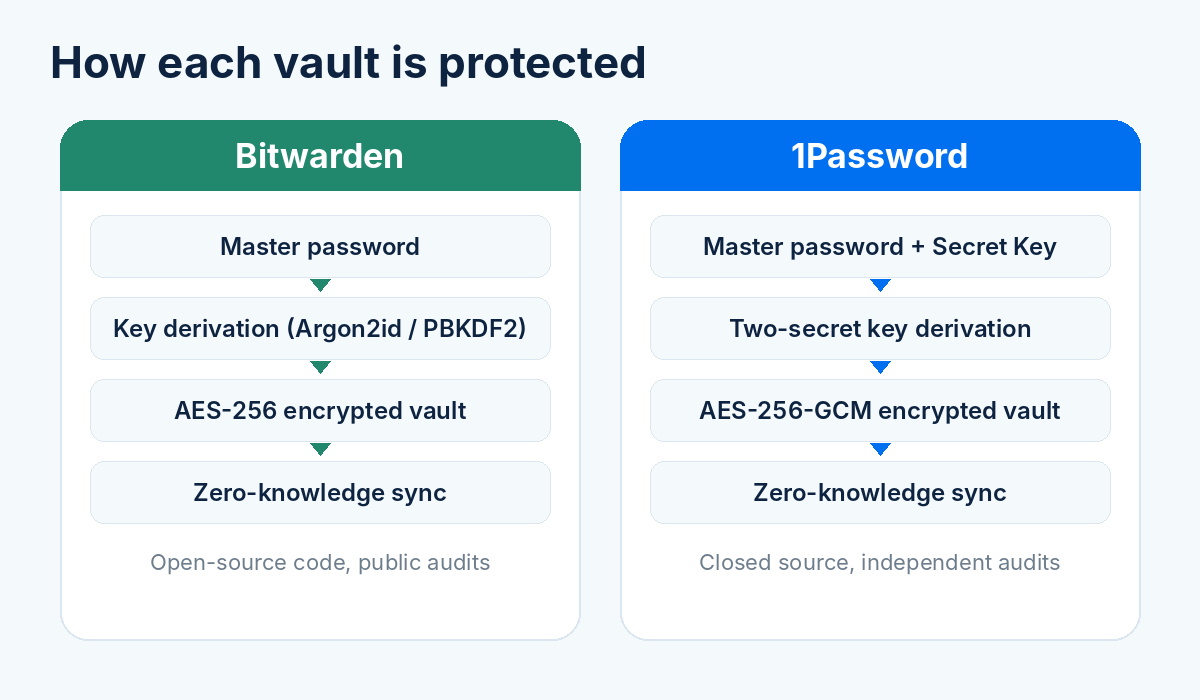
- • Both encrypt your data with AES-256.
- • Both use a zero-knowledge design: your vault is encrypted on your device before it syncs.
- • Both support two-factor authentication on your account and have been independently audited.
What is different
Bitwarden is open source, so its code can be inspected by anyone, and it publishes its security audits. This transparency is a big reason technical users trust it.
1Password is closed source, but it adds a Secret Key: a long, randomly generated code that is combined with your master password. Even if someone guessed your master password, they would still need that key to open a copy of your vault.
3. Features and password management
Both apps cover the essentials: a password generator, unlimited logins, secure notes, cards and identities, passkey support, secure sharing and an authenticator for 2FA codes. The differences are in the extras.
Where Bitwarden stands out
- • Open source and self-hosting for people who want full control.
- • Send, a feature to share text or files securely for a limited time.
- • A command-line tool and flexible options for developers.
- • Premium extras at a low price: vault health reports, emergency access and built-in 2FA codes.
Where 1Password stands out
- • Secret Key as an additional layer of protection.
- • Watchtower, which flags weak, reused or compromised passwords.
- • Travel Mode, which can hide sensitive vaults while you cross borders.
- • Built-in 2FA codes included in every plan.
In short, 1Password packs more convenience features into every plan, while Bitwarden gives you more flexibility and puts some features behind its low-cost Premium tier.
4. Autofill and everyday experience
This is the part you feel every day, and it is where opinions differ most.
1Password is widely praised for a refined, consistent interface and smooth autofill, especially on Apple devices. Organization with vaults and tags is intuitive.
Bitwarden has a more functional look. It works well and has improved a lot, but it can feel a little more technical, and some settings take time to learn.
Autofill quality can vary by website and by browser, so the best test is to try each app for a week with your own logins. Bitwarden's free plan and 1Password's 14-day trial make that easy.
5. Browser and device compatibility
Compatibility is strong on both sides. Each one offers:
- • Apps for iPhone, iPad and Android
- • Desktop apps for Windows, macOS and Linux
- • Extensions for Chrome, Edge, Firefox, Safari and Brave
- • A web vault you can open from any browser
- • Face ID, Touch ID and other biometric unlock
Bitwarden supports a few more browsers and platforms out of the box and can run on your own server. 1Password's apps are often described as feeling more native on each platform.
6. Pricing and free plans
Price is the clearest difference between the two, and both companies raised prices in 2026.
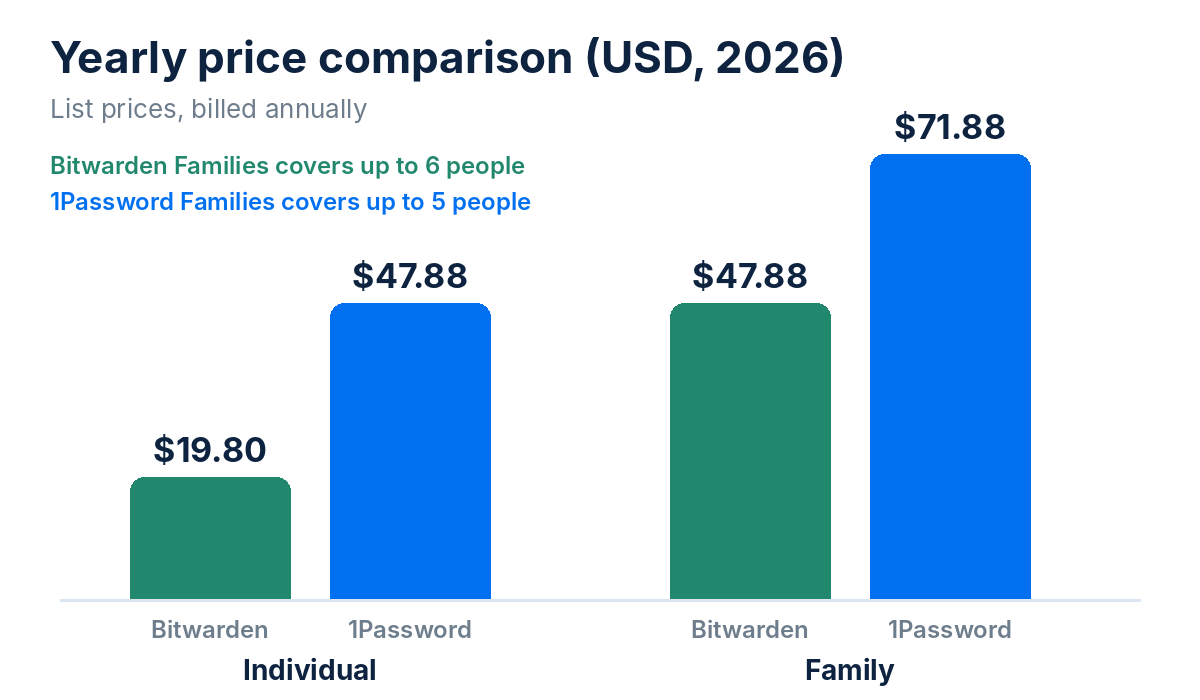
| Plan | Bitwarden | 1Password |
|---|---|---|
| Free plan | Yes, permanent | No, 14-day trial |
| Individual | Premium: $19.80/year (about $1.65/month) | $47.88/year (about $3.99/month) |
| Family | $47.88/year, up to 6 people | $71.88/year, up to 5 people |
Bitwarden Premium rose from $10 to $19.80 per year at the start of 2026, and 1Password's individual and family plans went up from late March 2026. Even after both increases, Bitwarden remains clearly cheaper.
7. Which is better for families and teams?
Families
Bitwarden Families covers up to six people for $47.88 per year, which is cheaper than 1Password Families at $71.88 per year for up to five. Both let you share vaults and give each member a private vault of their own.
If your family is not very technical, though, 1Password's simpler day-to-day experience can be worth the extra cost.
Teams and businesses
Both offer business plans with admin controls, shared vaults and reporting. Bitwarden Teams starts at about $4 per user per month, and 1Password's team plans start higher (a small-team starter pack costs roughly $20 per month for up to 10 people). Business pricing changes often, so check each vendor's page for your headcount.
8. Which is better for beginners?
Beginners usually want three things: a clean interface, little setup and no confusing options.
Many people find 1Password easier to start with. Bitwarden is still very approachable, and since it is free to start, it is a low-risk way to learn what a password manager does.
The Secret Key in 1Password is one extra thing to store safely, which is worth knowing if you are new to this.
9. Is there an alternative to Bitwarden and 1Password?
Looking for another option?
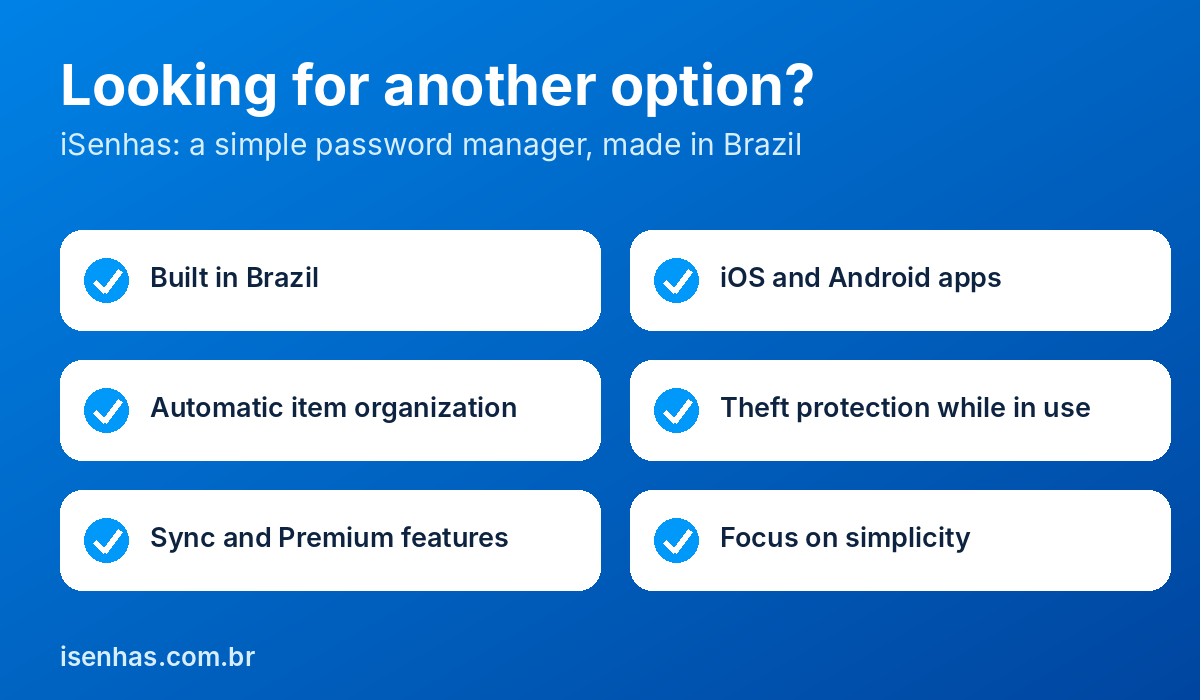
There are other good password managers, and iSenhas is one worth knowing if the two above do not fit. We are not saying it is better than Bitwarden or 1Password. It is simply built for a different kind of user.
iSenhas offers:
- • Developed in Brazil, with the Brazilian user in mind
- • Apps for iOS and Android
- • Automatic organization of your items
- • Protection against device theft while the app is in use
- • Sync and Premium features
- • A focus on simplicity
Who is iSenhas for?
iSenhas makes the most sense for people who want a simple app for personal use, who prefer a product made in Brazil, and who value automatic organization over a long list of settings.
If you need self-hosting, a fully open-source stack or company-wide admin controls, check carefully that iSenhas covers your needs, or lean toward Bitwarden or 1Password.
You can read more in our direct comparisons: 1Password vs iSenhas and iSenhas vs Bitwarden.
10. Final verdict
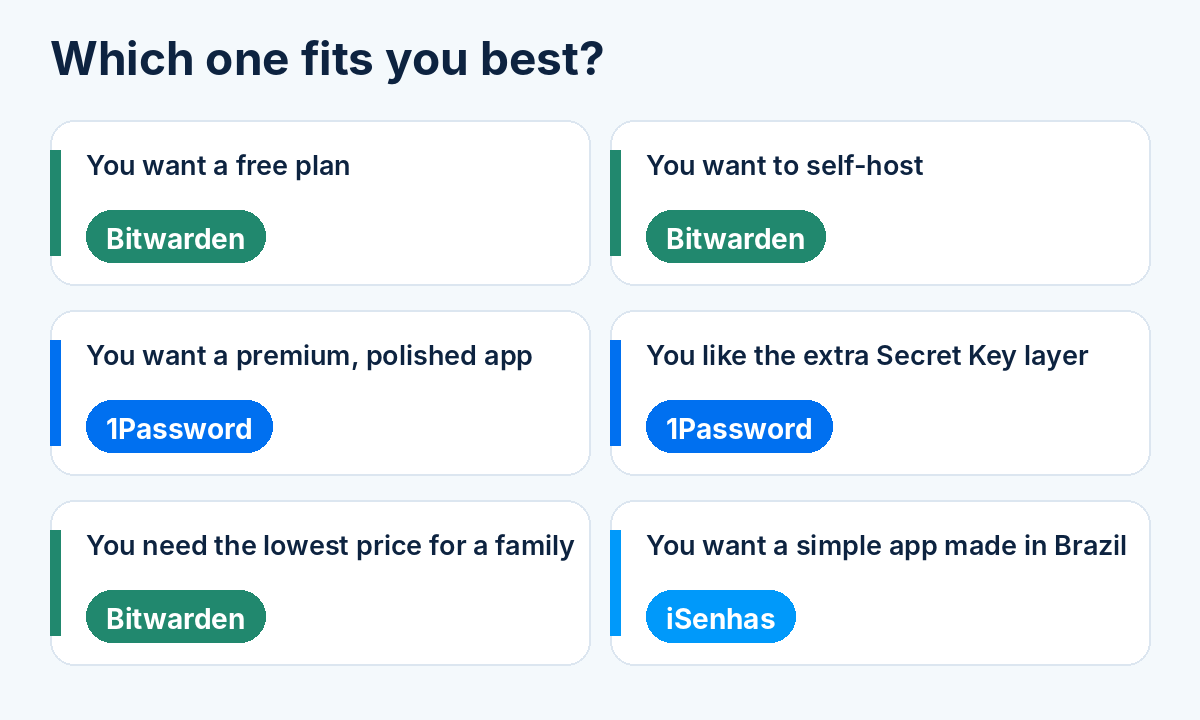
| If you... | Choose |
|---|---|
| Want a free plan or the lowest price | Bitwarden |
| Want open-source code or self-hosting | Bitwarden |
| Want a premium, polished experience | 1Password |
| Like the extra Secret Key layer | 1Password |
| Want a simple app made in Brazil | iSenhas |
Bitwarden is the best value and the most flexible choice. 1Password is the most polished, at a higher price. Both are excellent and safe choices.
Frequently asked questions
Is Bitwarden better than 1Password?
Neither is better for everyone. Bitwarden wins on price, transparency and flexibility. 1Password wins on polish and its Secret Key.
Is Bitwarden free?
Yes. It has a permanent free plan with unlimited passwords across your devices. Premium adds extras such as built-in 2FA codes, vault health reports and emergency access.
Does 1Password have a free plan?
No. 1Password only offers a 14-day free trial.
Which is more secure?
Both use AES-256 and zero-knowledge encryption. 1Password adds a Secret Key, and Bitwarden is open source. A strong, unique master password matters more than the difference between them.
Which is best for a family?
On price, Bitwarden Families is cheaper and covers six people. 1Password Families covers five and costs more, but many families prefer its simplicity.