- Can hackers see my passwords?
- How to check if your password has been leaked
- How hackers steal passwords
- Fake websites and phishing scams
- How to recognize a fake website
- What happens after a data breach
- How to know if a hacker accessed your account
- How to create strong passwords
- Frequently Asked Questions
Can hackers see my passwords?
Yes. Hackers can obtain your passwords in certain situations. This usually happens after data breaches, phishing attacks, malware infections, or when the same password is reused across multiple services. Fortunately, there are simple ways to greatly reduce these risks.
Many people believe that passwords are completely safe simply because they are hidden behind asterisks.
In reality, cybercriminals use a variety of techniques to steal login credentials and gain access to personal accounts.
In most cases, an attacker is not literally "seeing" your password on the screen in real time. Instead, the password may be exposed in a data breach, entered into a fake login page, captured by malware installed on your device, or discovered because the same password was previously used on another compromised service.
The good news is that there are simple steps you can take to significantly reduce these risks.
How to Check if Your Password Has Been Leaked
The iSenhas app checks whether your password has appeared in publicly known data breach databases. If it has, there's a strong indication that the password used for that service has been exposed and should be changed immediately, including on any other websites where the same password was reused.
⬇️ Download iSenhas and Check if Your Password Has Been Leaked
Want to learn more about what happens after a data breach?
Also read:
What to Do After a Data Breach
.
How Hackers Steal Passwords
There are several ways hackers can obtain passwords, even without physical access to the victim's device.
- • Data breaches
- • Fake login websites
- • Viruses and malware
- • Unsecured Wi-Fi networks
- • Weak and reused passwords
In many cases, users unknowingly provide their own login credentials to attackers.
🔐 How much are your passwords worth on the internetFake Websites and Phishing Scams
Phishing is one of the most common ways passwords are stolen. In this type of scam, criminals create a website that looks almost identical to a legitimate one—such as your bank, email provider, or social media platform—and send a link via SMS, email, or WhatsApp asking you to "verify" or "confirm" your login information.
As soon as you enter your username and password on the fake website, the information is sent directly to the attacker, even if your password is strong.
Here are some common warning signs of phishing:
- • Messages urging you to log in immediately
- • Website addresses that closely resemble the real domain but contain small differences
- • Emails or messages with poor grammar, spelling mistakes, or an alarming tone
- • Requests for information that the legitimate service would never ask for through a link
Whenever possible, type the website address directly into your browser instead of clicking links received in messages or emails.
How to Recognize a Fake Website
Before entering your username and password on any website, take a moment to check for signs that it may be a fake page created by scammers.
- • Make sure the address starts with "https://" and displays a security padlock
- • Compare the URL with the official domain character by character
- • Be suspicious of pages filled with ads or pop-ups
- • Poor translations, broken layouts, or low-quality images are common warning signs
- • Never access important websites through links received in messages—type the address manually instead
If you're unsure whether a website is legitimate, close the page and access the service using the official app or by typing the web address yourself.
What Happens After a Data Breach
When a website suffers a security breach, millions of passwords can end up circulating on the internet.
If you reuse the same password across multiple accounts, cybercriminals can automatically attempt to log in to your email, online banking, social media, and many other services.
This type of attack is extremely common and is known as credential stuffing.
How to Tell if a Hacker Has Accessed Your Account
Besides changing your password after a data breach, it's important to watch for warning signs that someone may already have access to your account.
- • Login activity from an unfamiliar location or device
- • Password reset or account change emails you didn't request
- • Two-factor authentication codes arriving when you weren't trying to sign in
- • Connected devices that you don't recognize
- • Messages or emails sent from your account that you didn't write
If you notice any of these warning signs, change your password immediately, enable two-factor authentication, and review the list of devices connected to your account.
🌍 The danger of saving passwords in your browserWeak Passwords Can Be Cracked in Seconds
Simple and predictable passwords can be cracked within seconds using automated tools.
Examples of weak passwords:
- • 123456
- • password123
- • qwerty
- • yourname+year
The shorter and more predictable your password is, the easier it becomes for attackers to crack it.
🔐 How to Create Strong Passwords Without Memorizing AnythingHow to Protect Your Accounts
These simple security practices can dramatically improve your online safety:
- • Use a unique password for every account
- • Enable two-factor authentication (2FA)
- • Never click suspicious links
- • Keep your apps and operating system up to date
- • Use a trusted password manager
Why a Password Manager Helps
A password manager lets you create a unique, strong password for every website without having to remember them all.
This means that even if one password is exposed in a data breach or phishing attack, your other accounts remain protected because each one uses a different password. Learn more about the iSenhas Password Manager .
How iSenhas Helps
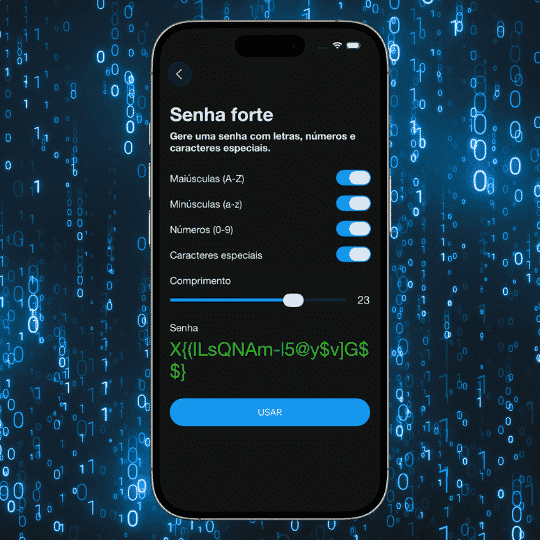
iSenhas automatically generates strong passwords, securely stores your credentials, and gives you fast access to your logins without relying on weak or reused passwords.
This greatly reduces the chances of your accounts being compromised by data breaches or automated attacks.
Frequently Asked Questions
A strong password is extremely difficult to crack. In practice, the biggest risks come from data breaches and phishing attacks, not from directly breaking a well-created password.
Yes. There are services that check whether your email address appears in leaked databases, which may indicate that passwords associated with it have also been exposed.
It helps block known malware, but it cannot prevent phishing attacks or the risks of reusing the same password across multiple services.
If your password has been exposed, yes, changing it is essential. However, you should also change it on every other website where the same password was reused.
Yes, especially through phishing attacks or malware. That's why banks recommend enabling two-factor authentication and never reusing your banking password on other services. See also: How to Protect Bank Accounts on Your Phone .
Yes, especially if your password was exposed in another service or entered into a fake login page. Enabling two-step verification greatly reduces this risk.
Face ID protects access to your device and specific apps, but it cannot prevent a password from being exposed in a hacked website or stolen through a phishing attack.
Immediately change the password you entered on that website, as well as on any other service where you reused the same password, and enable two-factor authentication.
Updated in July 2026. Article written by Davi Orzechowski, Electrical Engineer, creator of iSenhas and digital security specialist.